Thursday, 19 April 2012

Auto Installer 1.20

Automatically install applications!
How to use:
1, you need to copy all the applications you want to install on E:\ThinkChange\c\ or E:\ThinkChange\e
2, enter the AutoSisInstaller application, press "StartInstall" �, it will automatically install all the files in that folder
3, After the process is complete, there would be a summary telling you which files failed to install.

Why using AutoSisInstaller ?
1, Have many favourite applications to install after a firmware update?
2, Want to try many apps after bought a new phone?
3, Get bored to press many keys to install an application

Another cool usage:
Share with your friend your favourite applications! Install AutoSisInstaller to the memory card, and just plug your memory card into his device, all your favourite applications in the E:\ThinkChange\ folder will be automatically installed to his device!

Download Auto Installer v1.20
Disclaimer: This download is for personal use (mobile phones) only. Kindly do not copy, modify, distribute or sell the whole or parts of this file without permission of the creator.

BarBell Gym Tracker


The exercise tracker for gym enthusiasts! Database of over 300 exercises,
with detailed, illustrated guides on how to perform them. You can create a weekly training plan, set targets for each exercise, track your progress and share results to Facebook, Twitter and HeiaHeia. 

Not hacked yet Try DrWeb AV security hole.

1. Connect phone with PC, or memory card to cardreader, or memory card to other non-nokia device (need access to private folder)
 
-. If you will use E memory (mass storage, or memory card in devices without mass storage memory) download QuarantineDriversLDD.zip
 
-. If you will use F memory (memory card in devices with mass storage memory) download QuarantineF.zip
 
2. Unpack archive to choosen memory.
 

3. Download and install DrWeb6 for symbian
 
4. Launch DrWeb.(It will ask u d licence key just skip it)
 
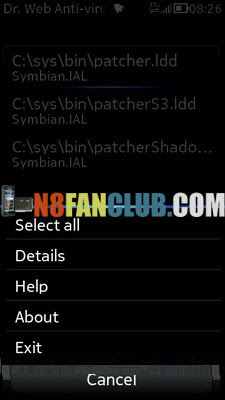
5. Go to Options - Quarantine

screenshot 

6. Go Options - Select all

 
 6. Go Options - Select all
 
7. Go Options - Restore
-. RomPacther drivers now in c:\sys\bin folder
 
8. Download and install RomPacther+ 3.1 Lite
 
9. Launch RomPatcher+ and apply Open4all patch
 
 . Now you have access to write in all system folders
-. If need you can apply installserver patch, or found in web installserver.exe (installserver needs for installing all applications without any certificate restrictions). For S^3 use my instalslerver.

Tuesday, 17 April 2012

VELOCITY^1 Fastest CFW

CFW Name: Velocity^1 CFW
Creator : Gaurav619 & AbhiTheRacer.
Model : Nokia 5233, 5230
Supported RM's : RM-625 & RM-588
Base Firmware : C6v41.0.10


The fastest cfw on the date. Abhi and gaurav are popular fw modder and this is latest mega upgraded fw by them. Belle nevibar and belle browser included in this updated.


Specification and Features :-


MESSAGING: - "Message:" word removed from keyboard input.
- Messages sent by you will be saved up to 999 messages
- Messaging application no longer lags when containing large number of
messages.
- N8 4x10 Qwerty + Alphanumeric added with Auto rotate QWERTY + 2x6
Landscape Grid + Small button in landscape - Default memory assigned to C:/ for better performance
- Save sent messages ON by default
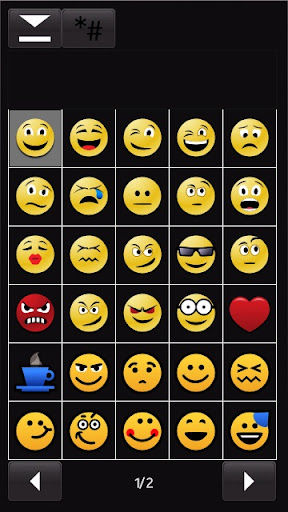
- N8 Emotions Support
- 6 page symbols support MENU: - Original N9 icons modified by us )
- No lags in menu
- Optimized to run very fast and smooth (Tweaked Kinetic Scrolling in Menu)
- Small button in landscape menu
- 6x2 N8 landscape layout for Menu BROWSER: - New C6v41 Belle Browser
- Default webpage set to " www.google.com " - Supports HTML5
- Download manager will be started on browser start-up to resume
- Browser will prompt to continue download if connection breaks due to power
failure
- Browser Cache set to C:\
- Auto form data save activated FILE MANAGER : - Nokia default file browser can send sisx, sis, jar and any protected items via
bluetooth, mms and uploads LIGHTS BEHAVIOUR: - All lights bugs are fixed
- Green Charging light disabled.
- Breathing light OFF by default
- Calling Vibration enabled. GRAPHICAL PERSONALISATIONS: - Bootscreen Volume set to : 10
- Custom Boot/Shutdown animation locations -
E:\Boot\
Startup.gif
Startup.mp3
Startup2.gif Startup2.mp3
Shutdown.gif
Shutdown.mp3 Camera: - Increased fps to get better quality shots and video recording
- camera completely fixed by us
- "camera already in use"completely bug fixed - Touch UI capture button working
- Flash Mode renamed to "Video mode"
- switch video light on renamed to "Image mode" MULTIMEDIA: - Camera will not leave in background after close it (SAVES RAM)
- Voice recorder set to High quality by default
- Voice recorder records upto 16:39:00 hours
- Camera Image Quality improved
- Gallery searching improved
- Share Online removed also from Photos Homescreen - OVI Music removed from Music Homescreen
- Video Capture predefined frame rate increased
- Music Player will read E:\Music\
- Music player will refresh faster
- One touch N8 Equalizer
- Bluetooth will save the received file in E:\Received.This folder will be created automatically INSTALLATION FEATURES: - Java permission is set to default
- PNHT installserver patch removed. Installserver patch provided with Rom
Patcher
- SwiPolicy changed which enable to install almost apps without RomPatcher patch General Modifications : - Symbian Belle Navi Bar added(Modified by us).
- N9 icons modified by us.
- Long press "0" will take you to memcheck
-"Restart" Option instead of "Lock Screen and Keys" in Power Menu by CODeRUS.
- Added Symbols to "Switch Off" and "Restart"
- Tap to Unlock added - PC/OVI Suite will recognise your phone as Nokia C6-00.
- Camera will not eat RAM after closing it.
- Default bluetooth name: Velocity^1
- FOTA reserved space removed to get more space in C:\ (Phone Memory)
- USB now will name as Nokia C6-00.
- Voice recording during call fixed. Your phone won't crash if you record and call someone at the same time.
- RAM Cache in C:\ for better performance
- Blazing Fast Screen Rotation
- Default Web Browser bookmarks are edited.
- Lags in Menu removed. The Kinetic Scrolling is optimized
- Display rotation is ON by default - Breathing light is OFF by default
- Digital clock set as default.
- Pure Fonts added with full symbol support and symbian belle navi bar
- Delivery Reports OFF by default in Messaging
- Theme effects are OFF by default
- Removed "Check for Updates" in Device Updates - "speed dialing" ON by default
- "In call timer" ON by default
- Profile "General" renamed to "Velocity^1"
- Homescreen landscape enabled. Dialer landscape disabled.
- "ShareOnline" button replaced with "Delete" in Photo Gallery, A mod by dan-av.
- Now you can set AutoKeyguard Lock time. - Now Music Player will not return you to Menu after exiting it.
- Anna Mediabar modified by us.Share online replaced with Bluethooth and videos
& tv replaced with Accel Switch,
- "Power Off" button wont take you to HS.
- Gallery loads faster
- Brightness mod added - Ringtones added.Better ringtones and loud Performance Upgrades: - Highly Increased Application/Gaming frame rates
- Increased Response Rate (Now touchscreen will be more responsive)
- Graphical Complexity reduced. Performance Booster without any side effects.
- Music Player response highly increased (Instantly pauses/plays on clicking the
buttons)
- Better effects complexity which should result in a speed increase - Increased Heap Size further to boost up performance
- Lags in Menu, messaging and Other Large Applicationsare totally removed
- Phone will never slow down and the RAM won't be decreasing (RAM Caching
modded)
- 75MB+ on C:\ (Phone memory)
- Smooth Kinetic Scrolling - Music Player is now a lot more faster
- CPU mod optimized to get complete stability and a great battery life also
- Tweaked starter files for better ram!
- Above 60 MB ram at start up. REMOVED APPS : All Default Themes, , Chat, Podcasting, OVI Contacts, OVI Music, Here and Now,
Online Support, Voice Commands, Phone Switch, My Nokia, Quick Office, Adobe
Reader, Share Online, Message Reader,file browser,about Applications Added : BTSwitch , Rom Patcher 3.1, KillME 1.36, AutoInstaller MediaBar: Mediabar edited "share online" to "Bluetooth" and "Vidoes & tv" to "Accel Switch".

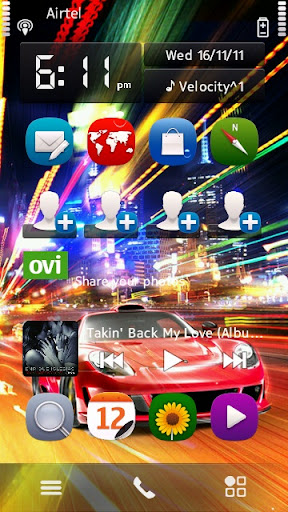
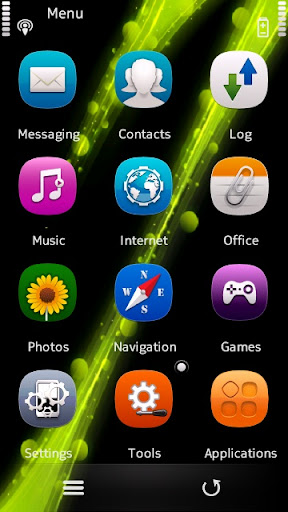
Screen shots:


Download: 
Velocity^1 C6 V41 ROFS :Click Here


How to apply:


Monday, 16 April 2012

TTPod (Music Player)


New version of powerful music player, now with S^3 devices support!

Key features:
● Full support for S^3 and S60v5 devices
● Special interface for control using touch screen
● Supported formats: MP3, AAC, WMA and M4A
● Built-in equalizer
● Sound fade, stereo widening and bass boost effects
● Support for skins and visual effects

● Ability to download songs , album covers and lyrics
● Online access to music charts
● Sleep timer
● Mini-player in background mode and many more features…


Change-logs:

● Reduced memory consumption
● Increased speed of opening main menu
● Optimized switching between songs
● Solved problem of automatic stop of playback on S60v5 devices
● Solved problem with help menu on S60v5 devices
● Solved issue of different volume level of different tracks in different formats
● Fixed problem with double- click in the playlist
● Improved scrolling smoothness and transparency of the list
● Fixed playback problem after locking the screen
● Solved Pause problem
● Fixed problem with access point selection 


Note :- If you get "System error" bug then please install the patch, here's the link>>>.Download Patch


True QT Pack For Integrating into the firmware

There are TWO VERSIONS of QT Pack from Aeronliru:

1) Standard Version.
Contain:
- QT v.4.7.3 Full
- Pips v.1.75 Plus Latest Patches And Upgrade
- OpenC SSL v.1.07 Plus Patches
- OpenC LIBZ Support Files v.1.07 Plus Latest Upgrade
- Qt Mobility v.1.1.3
- Qt WebKit v.4.7.3
- SQLite3 v.0.50.0
- Standard C++ v.1.07 Plus Latest Patches
- Symbian OS Pipes v.1.04 Plus Latest Patches
- Signal Server v.1.75
System Archieve Format:
- Bytepair (Standart)
Requirements:
- Symbian S^1 Phone
- 15.2 Free FW Mbytes
- Extract into the FW - free of change: Core(Rofs1)/Rofs2/Rofs3
- No needed to copy any file into disc "C"

Download:
MediaFire: QT 4.7.3 Full For CORE ROFS1 ROFS2 ROFS3 (BytePair)


2) Improved Version.
Contain:
- QT v.4.7.3 Full
- Pips v.1.75 Plus Latest Patches And Upgrade
- OpenC SSL v.1.07 Plus Patches
- OpenC LIBZ Support Files v.1.07 Plus Latest Upgrade
- Qt Mobility v.1.1.3
- Qt WebKit v.4.7.3
- SQLite3 v.0.50.0
- Standard C++ v.1.07 Plus Latest Patches
- Symbian OS Pipes v.1.04 Plus Latest Patches
- Signal Server v.1.75
System Archieve Format:
- RAW EPOC. Improvement Speed and Performance
Requirements:
- Symbian S^1 Phone
- 23.5 Free FW Mbytes
- Extract into the FW - free of change: Core(Rofs1)/Rofs2/Rofs3
- No needed to copy any file into disc "C"
Difference with BitePair Version:
- Improvement Speed and Performance

Download:
MediaFire: QT 4.7.3 Full For CORE ROFS1 ROFS2 ROFS3 (RAW Epoc)

P.S. About upgrading integrated QT Pack: This version of QT is latest at all. All new versions of QT is developed to Symbian S^3 phones and is not compatible with Symbian S^1.


All Credits to Aeronliru.

Saturday, 14 April 2012

Custom ROM NITRO^™ CHROME for v50.

Changelogs from Metal:

-Final effects "Nitro^ Chrome Exclusive" credits to Ermsk8r/sooy..
Thanks for the effort bro!!
-new input indicator on messaging
-ram on startup = 61mb
-ram after heavy usage = 50 to 56mb
-New themes credits to refsuj06 for editing, drigz for the base theme, and me for the background
-battery mod with a touch of speed. Credits to djraz, ken, and 000rohit.
-battery Electric icon from djraz
-Perfect Shiny Anna and N9 icons mixed by me
-integrated file browser
-now mp3 files can be only read in E: Music
-superb start up
-gallery delete button fixed with sbelle navibars
-now opening on apps are much faster.
-now you can make your own bootscreens
put your startup.gif, startup.mp3, shutdown.gif and shutdown.mp3 on e:boot
-reserved 5mb space on c after flash
-message viewer is set to small by default
-java permission mod (always allow)
-Touch vibrations is back Exclusive edited to make battery friendly.
-brightness option mod by dan-av
-press"0" to make bluetooth on
-new notification widget Anna Icon
-new calls person backgrounds (alien chrome) Exclusive!!
-must see!!! new splash Created by Therick.. Thank you so Much bro!!
 
 
Special Features:


Chrome Dialler Icon by Jhaorosario01


New Emoticon Ic0ns


New Shiny, N9 and Anna Mixed Icons credits to Areku, N0vag and Binh24. Devilbats and Refsuj06 for s0me app icons


New Input added credits to djraz


Bt switch added


Calls pers0n added (alien chr0me by me)


the theme named as Nitro^ Chrome thanks to jusfer


Gallery delete butt0n with navibars fixed


N9 battery Electric added


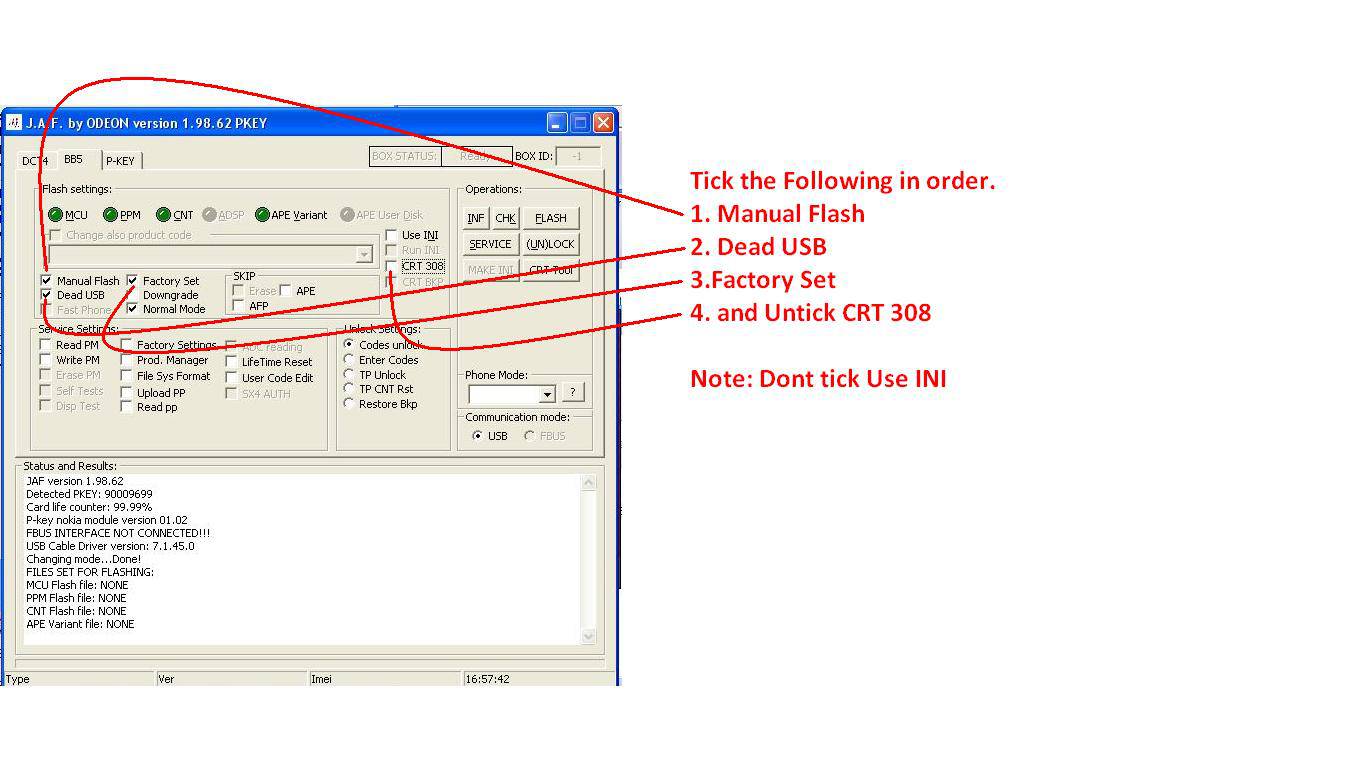
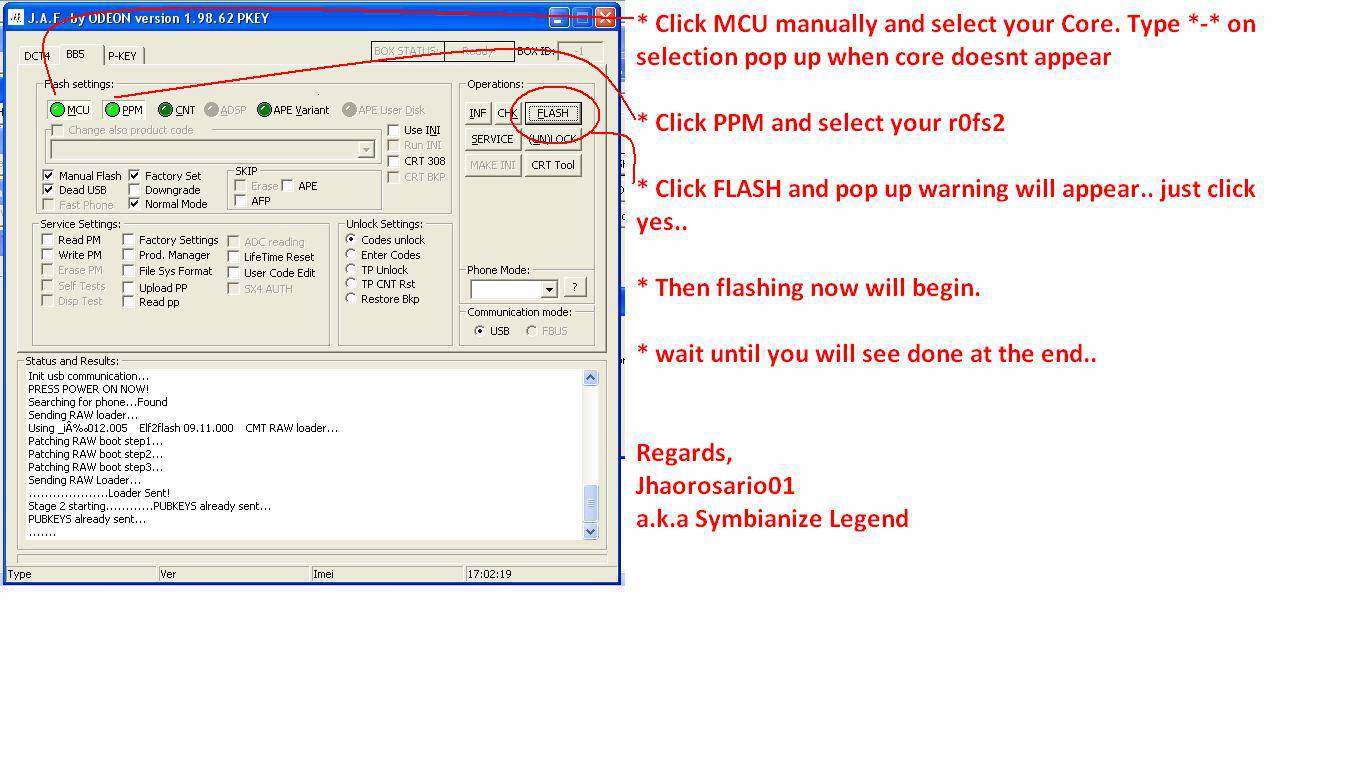
Tutorial on Flashing Nitro^ or with CORE and R0fs2 only FOR Newbies


here it is my rofs2 nitro^chrome rebulit
http://www.mediafire.com/?fifnndq2fhzo65e
features n8 qwerty
based on the best master piece of symbianize legend C6-00v41 NITRO^™ CHROME, i just add n8 virtual qwerty mod, so we needn't open the slide while create a message. that can reduce the risk of damage to the slide, we know that flexibe cable c6 is weak  Lips sealed


-also added mod camera to increase your result quality
-change spash screen to nitro^metal (i like it)
-change notificationwidget mif from nitro^metal
-and fix startup.gif,startup.mp3, etc in E:\ boot, thanks to cirsux
-fix auto start room patcher
-insane rotate speed
-auto rotate alphanumeric to qwerty

here is package for nitro^chrome N8 qwerty mod
http://www.mediafire.com/download.php?1yydsris01xtesq
pass= nitro

NOTE: This firmware is not created by me, I've just posted it here